Hi @HDLP,
Is there a reason you do not want to use Zephyr specific dimension “Zephyr Requirement” to represent issues covered by tests?
When you import Zephyr (Squad) data, eazyBI creates a set of Zephyr-specific dimensions and measures that work together for testing data analytic.
- “Issue” dimension represents Tests
- “Zephyr Requirement” dimension represent issues covered by Tests
- “Zephyr Defect” dimension represents issues registered during testing.
- “Zephyr Test Cycle” dimension represent testing Cycles
You can use mentioned dimension with zephyr specific measure “Zephyr Tests executed count” and dimension “Zephyr Test Status” to see the testing results of all test executions (See picture below). You can also Drill into dimension “Zephyr Test Status” to see results by status (here is now to do this: Drill into measure by another dimension level ).
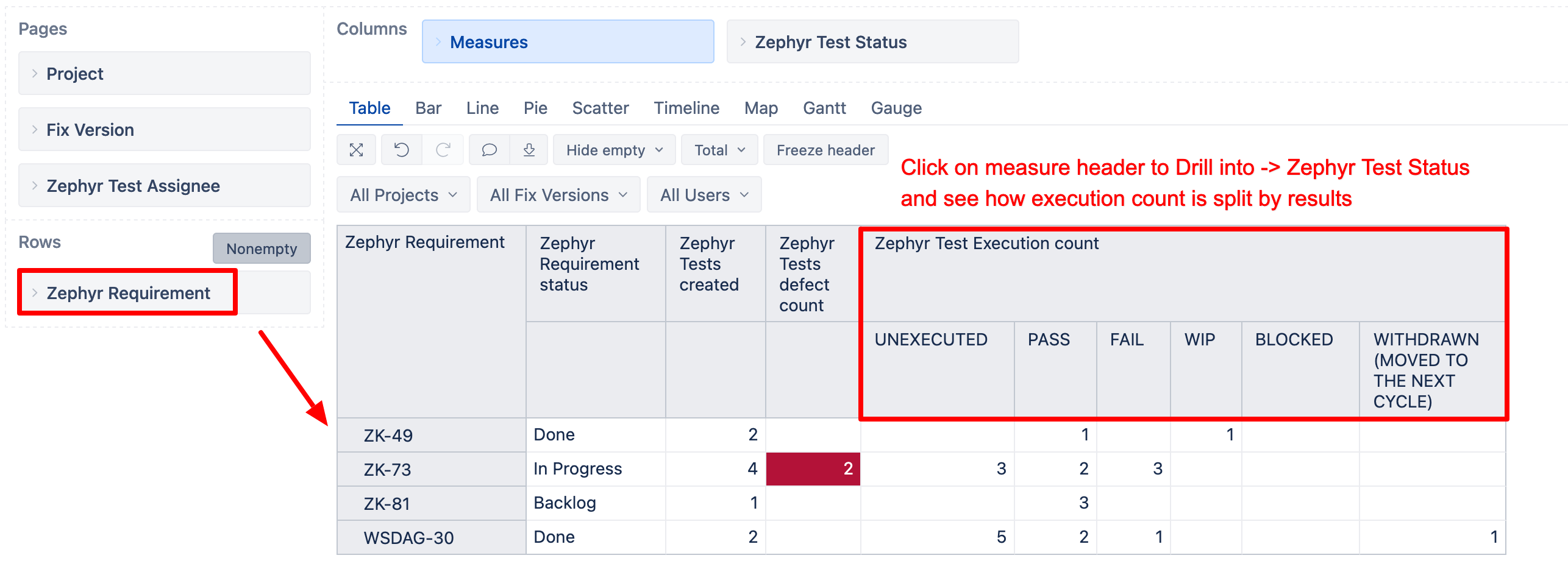
Importing issue links is a workaround if those “out-of-the-box” dimensions do not work for your use case.
Regarding “Zephyr Test last execution status”, it is a property for a test issue and represents the latest execution status over all cycles, requirements, and versions. In other words, it is a fixed value that does not change with report context (what you have on rows, columns, or page filters). To get value responding report context, you might want to use predefined measures, not properties.
More details on available dimensions and measures are here: Zephyr Squad Test Management for Jira - eazyBI for Jira.
Best,
Zane / support@eazyBI.com