Hey,
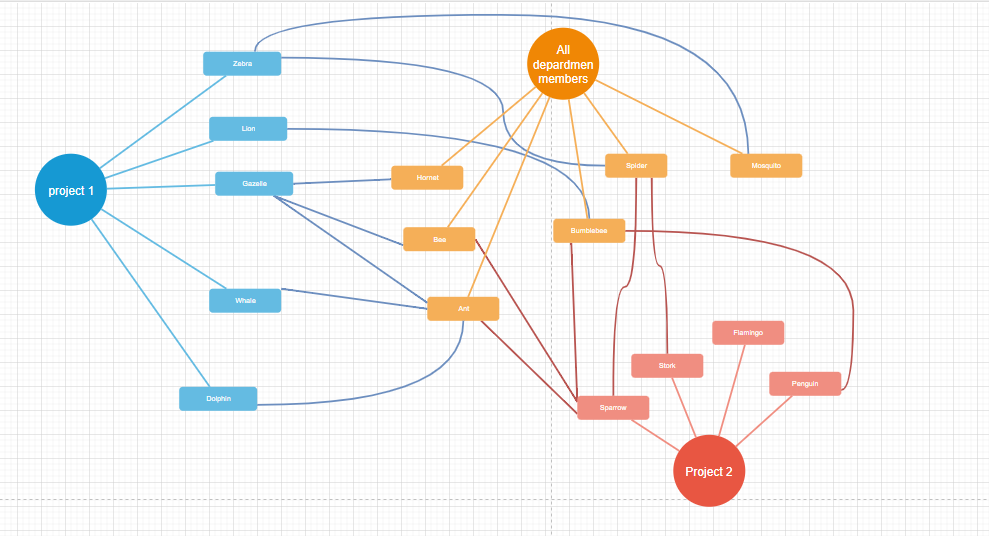
i try to build an “Network” in 2D or 3D that shown the Link between each member in Tempo Team(s) and the Projects/Epic’s.
i will select one member and the report show me in one page in which projects and Epics he is planned
and
if i select one project - who is planned for this project
with click on one epic or member I can see only this connections
as example
Hello @steinerw
Thanks for posting your question!
Unfortunately, eazyBI does not currently support network chart type. We do have a feature request in our backlog and I have upvoted it on your behalf.
That said, you can still achieve a similar analytical goal - seeing which team members are planned for which projects/epics -using eazyBI’s existing charts. Here are a couple of approaches that may work for you:
Table report with drill-down filtering:
- Place Logged by (or Logged by Team) in Rows and Project or Epic in Columns (or vice versa).
- Use Tempo planned hours as the measure.
- Add Logged by and Project/Epic to the Pages (filter) area so you can filter by a specific member to see their planned projects/epics, or filter by a specific project to see who is planned for it.
- Enabling “Hide empty rows and columns” will keep the view focused only on relevant combinations that match the report context.
Bar chart view:
- Place Logged by dimension in Rows and Tempo planned hours as the measure.
- Add Project or Epic as a second dimension in Rows to get a breakdown.
- Switch to a bar chart for a visual overview of planned hours per member per project.
While this won’t give you an interactive network/node diagram, the page filter approach does let you click through and focus on specific members or projects one at a time.
Best,
Elita from support@eazybi.com
Good Morning Elita,
many thank you for your help.
I am work in DC and my Tempo planned hours for Teams are empty - because it doen’t work.
I had to plan for each Team-Member by himself.
How can I get **Tempo planned hour by Team-Member?
**
greetings
steinerw
Hello @steinerw
It seems that the discussion is happening on two parallel threads - Tempo planner by User in Team - #2 by martins.vanags
As my colleague Martins suggested, consider importing the planned hours via the import options if you use the Tempo Planner add-on. If you do not use the add-on, please clarify how and where do you maintain these planned hours for your users.
Best,
Elita from support@eazybi.com
I found my issue → the import User for Import Tempo Planning hours had no permission to read the planning times → after set permission - now i have the informations I need.
thank you