Hi,
I am new to EazyBi and Jira.
I have created a project with some custom fields “Planned Start Date”. I want to generate a report for all the sub tasks of my resolved Stories/Bug with following columns.
- Issue Key
- Issue Summary
- Parent Key
- Parent Summary
- Planned Start Date (A custom Field)
- Due Date
- Date when the issue was moved from To do to In progress for first time
- Resolved Date
- Cumulative Hours spent
Can you please suggest how we can put conditions for column 6 and probable definition to be followed for above need?
Hi @Bhashyam_Ttv,
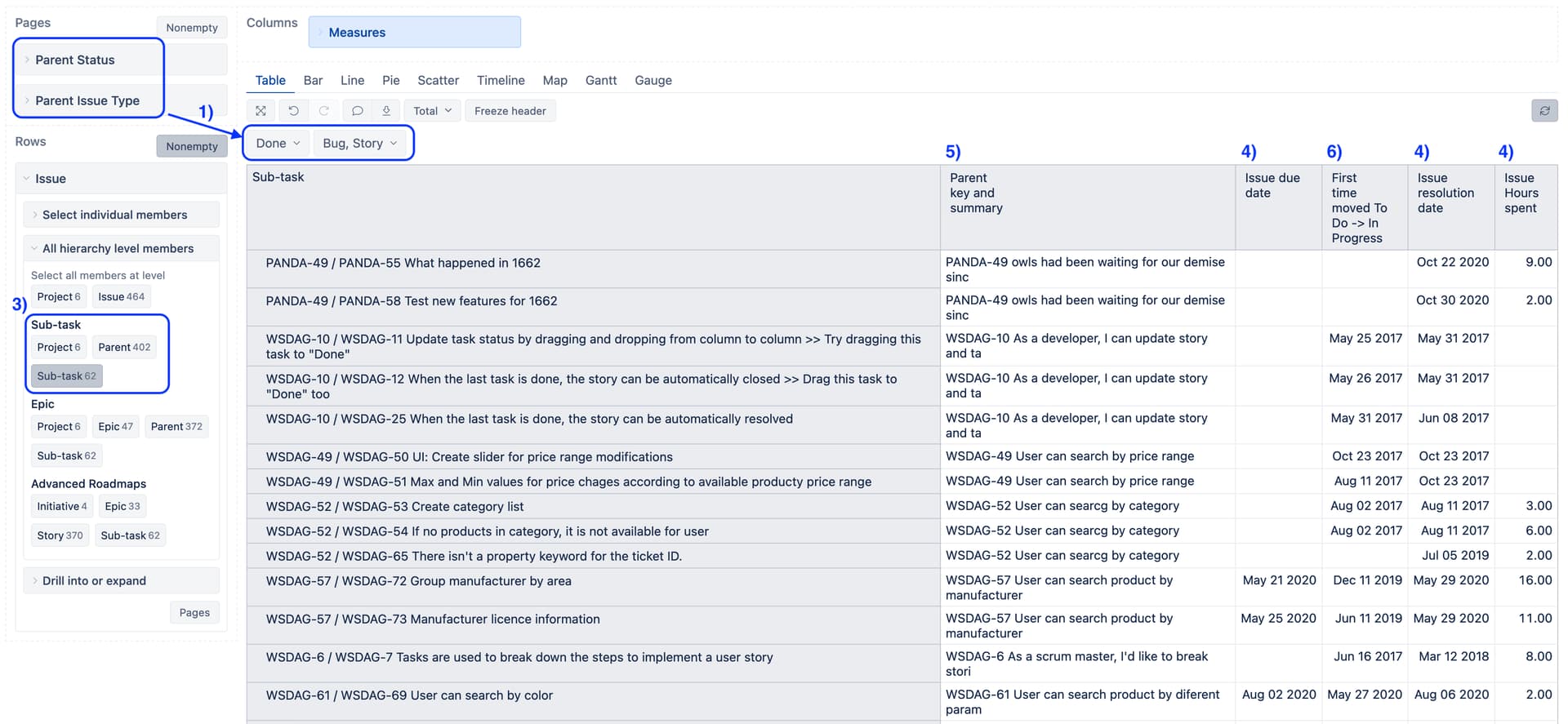
I understand you want to show a list of sub-task issues with descriptive information and filter data by Parent issue type (Story or Bug) and status (resolved issues).
-
To ensure the correct data filtering, import new dimensions “Parent Status” and “Parent Issue Type”.
You can do this by adding new advanced settings in eazyBI.
[[jira.issue_link_field_dimensions]]
name = "Parent Status"
source_dimension = "Status"
issue_key_column = "subtask_parent_key"
group = "Linked issue dimensions"

[[jira.issue_link_field_dimensions]]
name = "Parent Issue Type"
source_dimension = "Issue Type"
issue_key_column = "subtask_parent_key"
group = "Linked issue dimensions"
More details here: Issue link field dimensions
-
Import the custom field “Planned Start Date” as a property and measure.
Jira custom fields
-
On rows, set the “Issue” dimension. Select the Sub-task level from the Sub-task hierarchy.
-
On columns, select the required details on each sub-task. Select issue properties describing sub-tasks, “Issue Planned Start Date”, “Issue due date”, “Issue resolution date”, and “Issue Hours spent”.
-
In Measures, create new calcauted measure to show parent issue properties, key and summary
[Issue].CurrentHierarchyMember.Parent.GetCaption`
-
In Measures, create another calculated measure to show the date when the issue moved from To Do to In Progress for the firt time. For the calculation, use a tuple of measure “Transition to status first date” and dimension “Transition”:
([Measures].[Transition to status first date],
[Transition].[To Do => In Progress],
[Time].CurrentHierarchy.DefaultMember)
Set measure formatting to Date.
More details on calculated measures and tuple expressions are described in the documentation: Calculated measures.
The report might look like in the picture below:
Here is documentation describing principles how to build an issue list report with details: Project issues with details.
Best,
Zane / support@eazyBI.com