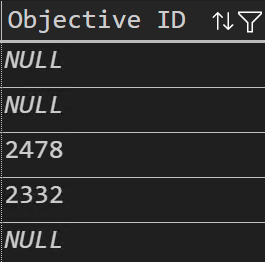
Hello,
I have column data from a SQL import where some rows are null. I would like to clean the data before import to my cube by setting those null values to ‘0’. In this way, the row is not treated as empty when creating reports, filtering data.
I am not javascript savvy so my debugging using _.isNull is not getting me anywhere.
What are your recommendations for cleaning data?
Thank you so much.
Screenshot taken from data output via VS Code SQL:
Hello @sathing,
One way could be to set the value to “0” already in the SQL statement using COALESCE function - COALESCE(<COLUMN_NAME>, 0) AS <COLUMN_ALIAS>.
If it’s not possible, then you can add a custom JavaScript code to modify the column value:
if (!value) {
  value = 0;
}
return value;
Regards,
Jānis Baiža
eazyBI developer
1 Like
Hello Janis,
Thank you for the feedback. Using your javascript recommendation, I learned that ‘value’ references the cell data in the column I’m focused on. I had to do a bit of enhancement to what you started with resulting in:
if (!value) {
return 0;
}
else
return value;
and now I get the result that I’m after