Hi everyone! I have a table that’s made up of parent tasks and also includes several columns with fields from related tasks. Similar to this demo setup - Stories with Bugs details - Issues - eazyBI Demo Training - eazyBI
Can you tell me if I can create a filter with a drop-down list that will contain values with a field from a subtask? My table looks something like Figure 1.
I have a task list (project SEC), and each task has a linked team (project Teams). I need to implement a filter (a drop-down list) based on the team lead field, which is present in all Team project tasks. How can I create a calculated member for pages?
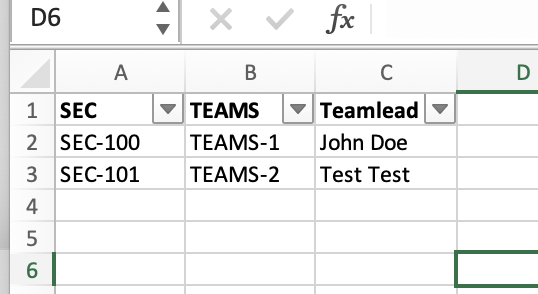
Any ideas? I’m trying to use a combination of dimension “Teamlead” and and the calculated measure presented below but it doesn’t work
Aggregate(
Filter(
Descendants([Teams].CurrentMember,[Teams].[Teams]),
 DefaultContext((
      [Measures].[Issues created],
      [Issue].[Issue].GetMemberByKey(
        [Teams].CurrentMember.KEY),
      [Teamlead].CurrentHierarchy.CurrentMember
    )
  )))
Despite this, I can get the values of the team lead field simply in columns using the following calculated measure
(
  [Measures].[Issue Teamlead],
  [Issue].[Issue].GetMemberByKey(
    [Issue].CurrentHierarchyMember.get('Teams')
  )
)
Hi @sn1ffer
Please check this demo report:
Note the “Status” dimension is used to calculate the linked issues by this status regardless of what is the status of the parent issue from SEC project.
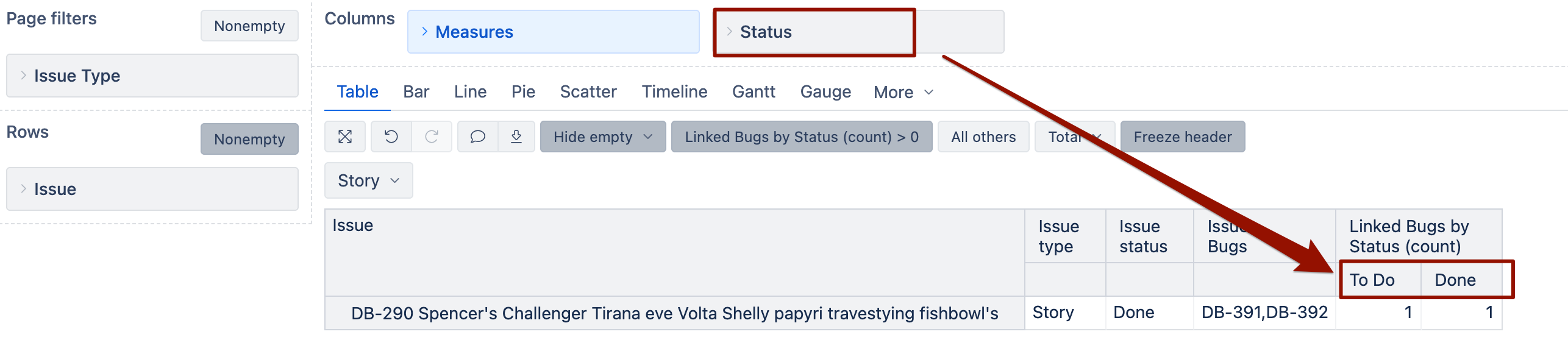
You can also use the “Status” dimension as a page filter, when the measure “Linked Bugs by Status (count)” is used in the report, it should count linked issues by the filtered status.
Idea is to use the native “Teams” dimension to filter related tasks from Teams project and ignore the team on the parent issue.
For this to work, you must import both SEC and Teams project issues in the cube.
Martins / eazyBI support
@martins.vanags Yes, I saw this demo, but I’m not quite sure how to use this dimension in Page Filters. Since there are so many team leads, the demo implementation method won’t work for me. I need to create a drop-down list with all possible values. Could you please help?
Just in case, I’ll clarify the structure again. I have a SEC task, which contains a Teams field, which contains the task key from the TEAMS project. When navigating to this team task, there’s a TeamLead field, which is the value we need to filter tasks by.
Hey @sn1ffer
How exactly do you link the sec tand teams tickets in Jira?
Do you use native issue links, or do you have some calculated custom field “Teams” where you select the ticket key from the Teams project?
Can you share a screenshot showing one example of an SEC task linked to the Teams field? I want to see how exactly they are linked.
Also, please share the screenshot from the corresponding TEAMS ticket showing the TeamLead field type (single-select, multi-value, label, single-line text field, etc).
If you can’t share the screenshots here on the public community page, feel free to reach out to support@eazybi.com
Martins / eazyBI
@martins.vanags Done, sent the letter
after Teams is imported as dimension from a scripted field with these settings:
properties_from_dimension = 'Issue'
And also “TeamLead” dimension is imported; you could create a user-defined calculated measure with this MDX code
--optimized for status page filters
CASE WHEN
[Issue].CurrentMember.Level.Name = 'Issue'
THEN
Sum(
--go through all Teams
Filter(
  [Teams].[Teams].GetMembersByKeys(
    [Issue].CurrentMember.Get('Teams') --if linked issues imported as property
  ),
  DefaultContext(
    (
      [Measures].[Issues created],
      [Issue].[Issue].GetMemberByKey(
        [Teams].CurrentMember.Key
      ),
      [TeamLead].CurrentHierarchyMember,
      [Project].CurrentHierarchy.DefaultMember
    )
  ) > 0
),
--aggregate linked Teams ignoring the main issue's Teamlead and Projcect
(
  [Measures].[Issues created],
  [TeamLead].CurrentHierarchy.DefaultMember
)
)
ELSE
--if not issue level in report
CASE WHEN
[TeamLead].CurrentHierarchyMember.Level.Name = 'TeamLead' --if status level is selected or displayed in report
THEN
Sum(
  --go through all linked Teams
  Filter(
    DescendantsSet([Teams].CurrentMember, [Teams].[Teams]),
    --check if linked Teams teamlead matches selected teamlead
    Cast([TeamLead].CurrentMember.Key AS STRING) = [Teams].CurrentMember.GetString('TeamLead')
  ),
  CASE WHEN
    DefaultContext(
      (
        [Measures].[Issues created],
        [Issue].[Issue].GetMemberByKey(
          [Teams].CurrentMember.Key
        ),
        [TeamLead].CurrentHierarchyMember,
        [Project].CurrentHierarchy.DefaultMember
      )
    ) > 0
  THEN
    --aggregate linked Team ignoring the Issue teamlead
    (
      [Measures].[Issues created],
      [TeamLead].CurrentHierarchy.DefaultMember
    )
  END
)
ELSE
--if report is not used at status-level
Sum(
  --go through all linked Teams
  Filter(
    DescendantsSet([Teams].CurrentMember, [Teams].[Teams]),
    --check if linked Teams Status matches selected TeamLead and Project
    DefaultContext(
      (
        [Measures].[Issues created],
        [Issue].[Issue].GetMemberByKey(
          [Teams].CurrentMember.Key
        ),
        [TeamLead].CurrentHierarchyMember,
        [Project].CurrentHierarchy.DefaultMember
      )
    ) > 0
  ),
  --aggregate linked main issues' teamlead and project
  (
    [Measures].[Issues created],
    [TeamLead].CurrentHierarchy.DefaultMember
  )
)
END
END
Then select the “TeamLead” dimension as a page filter in your report.
This code would count linked teams for each SEC task according to TeamLead filtered value in the page filter
It would let you filter the “Issue” dimension members by the TeamLead of the respective Teams value, ignoring the TeamLead value for the SEC task.
Martins / eazyBI support
We also added the ability to filter and display in the table tasks for which the command field is empty.
SUM(
DescendantsSet(
[TeamLead].CurrentMember,
[TeamLead].[TeamLead]
),
CASE WHEN
[TeamLead].CurrentMember.Name = "(none)" --if none selected as page filter and only one teamlead selected
THEN
IIF(
[Measures].[Issue Teams] = "(none)",
[Measures].[Issues created],
0
)
ELSE
--optimized for status page filters
CASE WHEN
[Issue].CurrentMember.Level.Name = 'Issue'
THEN
Sum(
--go through all Teams
Filter(
[Teams].[Teams].GetMembersByKeys(
[Issue].CurrentMember.Get('Teams') --if linked issues imported as property
),
DefaultContext(
(
[Measures].[Issues created],
[Issue].[Issue].GetMemberByKey(
[Teams].CurrentMember.Key
),
[TeamLead].CurrentHierarchyMember,
[Project].CurrentHierarchy.DefaultMember
)
) > 0
),
--aggregate linked Teams ignoring the main issue's Teamlead and Projcect
(
[Measures].[Issues created],
[TeamLead].CurrentHierarchy.DefaultMember
)
)
ELSE
--if not issue level in report
CASE WHEN
[TeamLead].CurrentHierarchyMember.Level.Name = 'TeamLead' --if status level is selected or displayed in report
THEN
Sum(
--go through all linked Teams
Filter(
DescendantsSet([Teams].CurrentMember, [Teams].[Teams]),
--check if linked Teams teamlead matches selected teamlead
Cast([TeamLead].CurrentMember.Key AS STRING) = [Teams].CurrentMember.GetString('TeamLead')
),
CASE WHEN
DefaultContext(
(
[Measures].[Issues created],
[Issue].[Issue].GetMemberByKey(
[Teams].CurrentMember.Key
),
[TeamLead].CurrentHierarchyMember,
[Project].CurrentHierarchy.DefaultMember
)
) > 0
THEN
--aggregate linked Team ignoring the Issue teamlead
(
[Measures].[Issues created],
[TeamLead].CurrentHierarchy.DefaultMember
)
END
)
ELSE
--if report is not used at status-level
Sum(
--go through all linked Teams
Filter(
DescendantsSet([Teams].CurrentMember, [Teams].[Teams]),
--check if linked Teams Status matches selected TeamLead and Project
DefaultContext(
(
[Measures].[Issues created],
[Issue].[Issue].GetMemberByKey(
[Teams].CurrentMember.Key
),
[TeamLead].CurrentHierarchyMember,
[Project].CurrentHierarchy.DefaultMember
)
) > 0
),
--aggregate linked main issues' teamlead and project
(
[Measures].[Issues created],
[TeamLead].CurrentHierarchy.DefaultMember
)
)
END
END
END
)