Hello community,
I have a question.
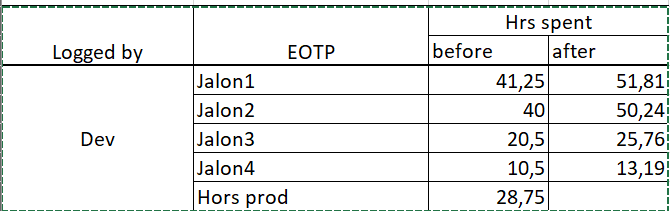
I have several milestones planned for my software, and within those milestones, I have non-production tasks, such as meetings and support.
Ideally, I would like to distribute the number of hours spent on these tasks across the other milestones based on the time spent on them.
Here’s an example:
- This result was obtained using the following calculation:
Jalon1 + Jalon2 + Jalon3 + Jalon4 = 112.25 (100%)
- percentage of time spent by milestone :
Jalon1 → 41.25/112.25 = 0.367483296 %
Jalon2 → 40/112.25 = 0.356347439 %
Jalon3 → 20.5/112.25 = 0.182628062 %
ETC…
- I apply the % to non-production items.
Hors prod for jalon1 → 28.75 * 0.367483296 = 10.56514477 hr
Hors prod for jalon2 → 28.75 * 0.356347439 = 10.24498886 hr
etc…
- I add up the non-production hours at the milestone.
Jalon1 + %hors prod → 41.25 + 10.56514477 = 51.81 hrs
Jalon2 + %hors prod → 40 + 10.24498886 = 50.24 hrs
ETC…
If you have any ideas, I’m all ears 
Best regards
Hi @Guillaume.D ,
You might create a calculation that inspects the current EOTP member name and only returns values for those having a name starting with Jalon.
When the EOTP is relevant, the value should be increased by the share of this Jalon from all EOTPs.
The expression might be as follows.
CASE WHEN
-- current line is Jalon
 [EOTP].CurrentMember.Name MATCHES 'Jalon.*'
 AND
-- there are hours for this EOTP - to avoid division by zero
 [Measures].[Hours spent]>0
THEN
-- original productive hours
 [Measures].[Hours spent]
 +
-- share of current EOTP from all productive hours
 ([EOTP.CurrentMember],
  [Measures].[Hours spent])
  /
(
-- hours spent on all EOTPs - productive and overhead
([EOTP].DefaultMember,
 [Measures].[Hours spent])
-- overhead hours spent
 -
 ([EOTP].[Hors prod],
  [Measures].[Hours spent])
 )
 *
-- multiply the share by the overhead hours to be split
 ([EOTP].[Hors prod],
  [Measures].[Hours spent])
END
Regards,
Oskars / support@eazyBI.com
it’s perfect!
That’s exactly what I needed.
Thank you very much @oskars.laganovskis