Hi,
I have multiple trend and predictions based on the last X time periods which currently include the 2 weeks of christmas break and it throws off my trends.
Is there a way to exclude them from the considered time period?
Thanks,
Marilou
Hi,
I have multiple trend and predictions based on the last X time periods which currently include the 2 weeks of christmas break and it throws off my trends.
Is there a way to exclude them from the considered time period?
Thanks,
Marilou
Hello @Marilou
Thanks for posting your question!
There may be several ways to address this, but I need more context regarding your report. Do you not want to include the holidays in your calculations, or do you not want to see those weeks/days in your Time dimension?
Depending on the calculations you use, you can automatically disregard the days if you configure your import options with additional non-work days (see more here - Data from Jira) . But they will only work if you use functions such as Workdays in your calculation.
To give you better guidance, please share your report definition and, preferably, also a screenshot indicating what you would not like to see. If you don’t want to share it here on Community, please reach out to us directly at support@eazybi.com, referring to this Community post.
Best wishes,
Elita from support@eazybi.com
Hello @Elita.Kalane,
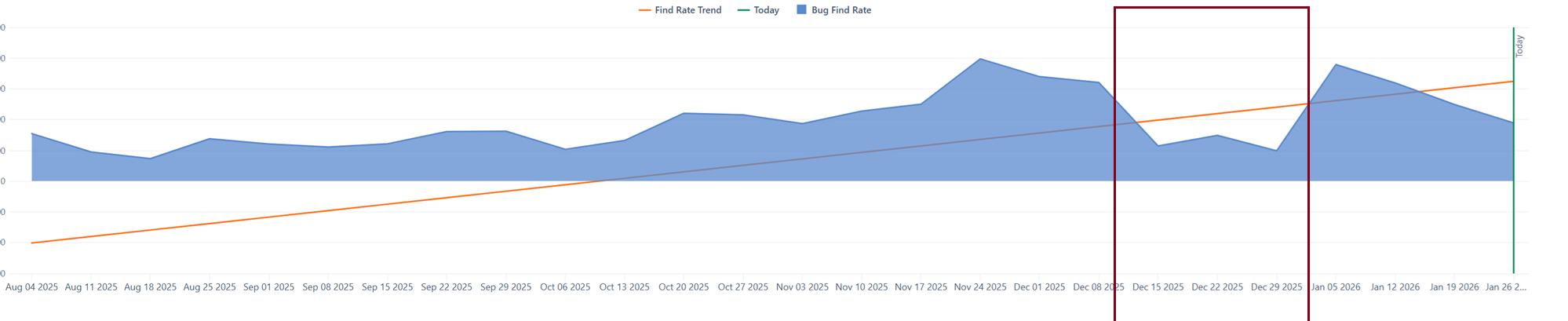
I would like to remove the 3 data points of week 51, week 52 and week 1 from the Find rate trend calculation. I don’t mind if it’s still visible on the timeline itself. (See 1st image)
This is my current trend calculation
LinRegPoint(
– Numeric expression output x
DateToTimestamp([Time].CurrentHierarchyMember.StartDate),
– Set expression - input period
[Time.Weekly].[Week].DateMembersBetween(“8 weeks ago”, “last week”),
– Numeric expression input y
[Measures].[Issues created],
– Numeric expression input x
DateToTimestamp([Time].CurrentHierarchyMember.StartDate)
)
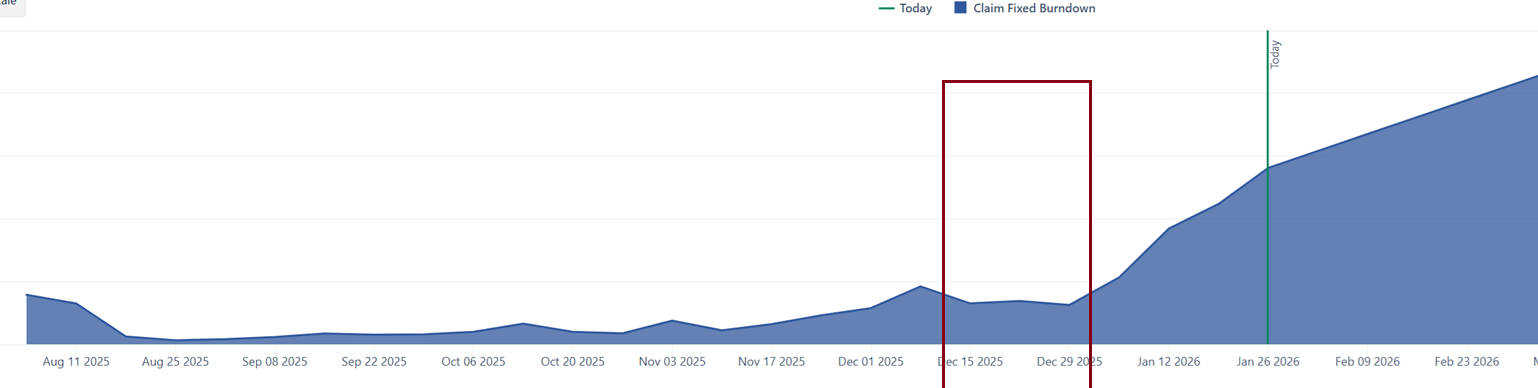
I would also like to remove the same data points from my historical data trends. (See 2nd image)
CASE WHEN(CASE
WHEN
– for all time periods until now, including current period
DateAfterPeriodEnd(Now(), [Time].CurrentHierarchyMember.PrevMember)
THEN
– measure Open issues is displayed
Val([Measures].[Claim Fixed Backlog])
ELSE
Val([Measures].[Claim Fixed Backlog] -
Sum(
[Time].CurrentHierarchy.Level.CurrentDateMember.NextMember:
[Time].CurrentHierarchyMember,
– average Open issue changes during previous six time periods (days, weeks or months. choose a time member)
(([Time].CurrentHierarchy.Level.CurrentDateMember.Lag(7),
[Measures].[Claim Fixed Backlog])-
([Time].CurrentHierarchy.Level.CurrentDateMember,
[Measures].[Claim Fixed Backlog]))
/7
))
END) < 0
THEN 0
ELSE (CASE
WHEN
– for all time periods until now, including current period
DateAfterPeriodEnd(Now(), [Time].CurrentHierarchyMember.PrevMember)
THEN
– measure Open issues is displayed
Val([Measures].[Claim Fixed Backlog])
ELSE

Val([Measures].[Claim Fixed Backlog] -
Sum(
[Time].CurrentHierarchy.Level.CurrentDateMember.NextMember:
[Time].CurrentHierarchyMember,
– average Open issue changes during previous six time periods (days, weeks or months. choose a time member)
(([Time].CurrentHierarchy.Level.CurrentDateMember.Lag(7),
[Measures].[Claim Fixed Backlog])-
([Time].CurrentHierarchy.Level.CurrentDateMember,
[Measures].[Claim Fixed Backlog]))
/7
))
END)
END
Thank you for the reply and have a nice day!
Marilou
Hi @Marilou
Thanks for the additional information.
Please try the measure below for the LinReg.
LinRegPoint(
  -- Numeric expression output x
  DateToTimestamp([Time].CurrentHierarchyMember.StartDate),
  -- Set expression - input period (excluding weeks 51, 52, and 1)
  Filter(
    [Time.Weekly].[Week].DateMembersBetween("8 weeks ago", "last week"),
    NOT [Time].CurrentHierarchyMember.Name MATCHES '.*W(51|52|01).*'
  ),
  -- Numeric expression input y
  [Measures].[Issues created],
  -- Numeric expression input x
  DateToTimestamp([Time].CurrentHierarchyMember.StartDate)
)
And this one for the backlog
CASE WHEN
  CASE
  WHEN
    -- for all time periods until now, including current period
    DateAfterPeriodEnd(
      Now(),
      [Time].CurrentHierarchyMember.PrevMember
    )
  THEN
    Val([Measures].[Claim Fixed Backlog])
  ELSE
    -- forecast calculation excluding weeks 51, 52, and 01
    Val(
      [Measures].[Claim Fixed Backlog] -
      Sum(
        Filter(
          [Time].CurrentHierarchy.Level.CurrentDateMember.NextMember:
            [Time].CurrentHierarchyMember,
          NOT [Time].CurrentHierarchyMember.Name MATCHES
            '.*W(51|52|01).*'
        ),
        -- calculate change based on filtered previous periods
        Avg(
          Filter(
            [Time].CurrentHierarchy.Level.CurrentDateMember.Lag(10):
              [Time].CurrentHierarchy.Level.CurrentDateMember.PrevMember,
            NOT [Time].CurrentHierarchyMember.Name MATCHES
              '.*W(51|52|01).*'
          ),
          (
            [Time].CurrentHierarchyMember.NextMember,
            [Measures].[Claim Fixed Backlog]
          ) -
          (
            [Time].CurrentHierarchyMember,
            [Measures].[Claim Fixed Backlog]
          )
        )
      )
    )
  END < 0
THEN 0
ELSE
  CASE
  WHEN
    -- for all time periods until now, including current period
    DateAfterPeriodEnd(
      Now(),
      [Time].CurrentHierarchyMember.PrevMember
    )
  THEN
    Val([Measures].[Claim Fixed Backlog])
  ELSE
    -- forecast calculation excluding weeks 51, 52, and 01
    Val(
      [Measures].[Claim Fixed Backlog] -
      Sum(
        Filter(
          [Time].CurrentHierarchy.Level.CurrentDateMember.NextMember:
            [Time].CurrentHierarchyMember,
          NOT [Time].CurrentHierarchyMember.Name MATCHES
            '.*W(51|52|01).*'
        ),
        -- calculate change based on filtered previous periods
        Avg(
          Filter(
            [Time].CurrentHierarchy.Level.CurrentDateMember.Lag(10):
              [Time].CurrentHierarchy.Level.CurrentDateMember.PrevMember,
            NOT [Time].CurrentHierarchyMember.Name MATCHES
              '.*W(51|52|01).*'
          ),
          (
            [Time].CurrentHierarchyMember.NextMember,
            [Measures].[Claim Fixed Backlog]
          ) -
          (
            [Time].CurrentHierarchyMember,
            [Measures].[Claim Fixed Backlog]
          )
        )
      )
    )
  END
END
Best wishes,
Elita from support@eazybi.com