Hi @FrancescoVl ,
For this report, you can create a calculated measure in the Measures. The logic is not trivial, as it looks up the Tempo Account from the issue hierarchy: checking the issue itself first, then moving up to parent levels if the issue is empty. So the hierarchy is essential for the solution.
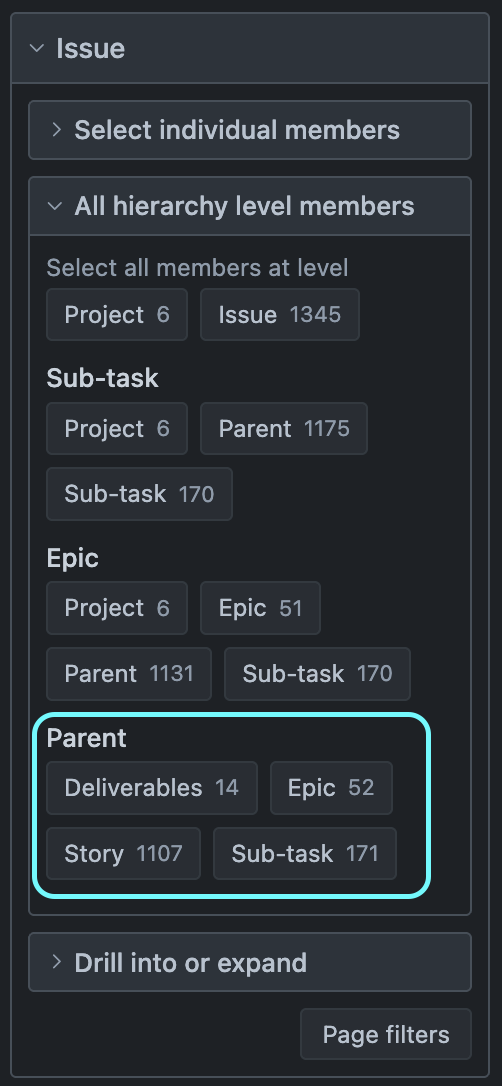
Below is a solution assuming you are on the Cloud and have imported a parent key. But you can make a similar solution for the Plans hierarchy (on Data Center) or a custom Issue hierarchy representing four hierarchy levels:
- Deliverables (issues with type Deliverable)
- → Epics (issues with type Epic)
- → Stories (issues with type Story, Bug, Task)
- → Subtasks (all sub-task issue type)
This is how you can build the report:
-
Import Parent key - Make sure you have imported the Parent key in advanced settings so you can use the Issue.Parent hierarchy for the calculation.
-
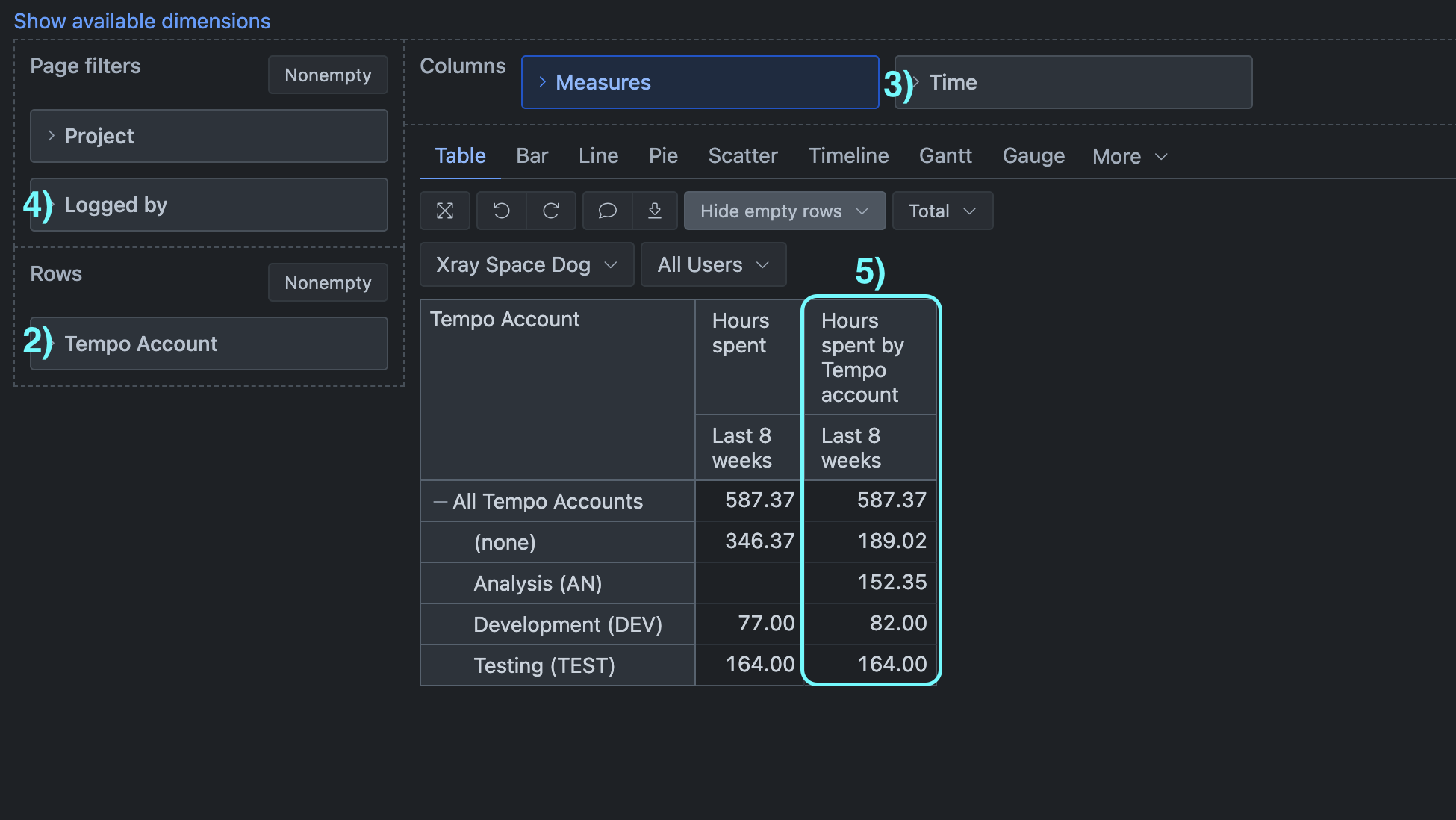
In the report, set “Tempo Account” dimension on the report rows.
-
On columns, set the “Time” dimension. Choose a calculated member representing a specific period, like “Last 4 weeks”. In the “Time” dimension, you can make a new calculated member to represent another relative period, like the last 8 weeks; see the documentation for more details and examples on how to do this: Calculated members in Time dimension .
For example:
Aggregate(
  [Time.Weekly].[Week].DateMembersBetween('8 weeks ago', 'today')
)
-
On pages, add the “Logged by” dimension to filter data by the user who logged hours, if that is needed.
-
In Measures, create a new calculated measure. The logic of the calculation:
- Iterate through individual issues with logged hours.
- For each issue, locate it in the Parent hierarchy based on issue type.
- Then find the closest Tempo account: the issue’s assigned Tempo account, or the closest parent Tempo account if the issue has none.
- Sum up logged hours if the Tempo account on the report rows matches the closest found Tempo account.
The expression might look like below. It is a bit lengthy because each hierarchy level should be treated separately:
CASE WHEN --individual Tempo account on report rows
  [Tempo Account].CurrentHierarchyMember.Level IS
    [Tempo Account].[Account]
THEN --group hours psent by closest tempo account based on issue Parent hierarchy
  Sum(
    --set of issue with logged huors
    Filter(
      Descendants([Issue].CurrentMember,[Issue].[Issue]),
      NOT IsEmpty([Issue].CurrentMember.Get('Hours spent'))
    ),
    --for each issue get hours spent based on its location in Parents hierarchy
    CASE
      WHEN --(1) Plans lowest hierarchy level (sub-task)
        [Measures].[Issue type] MATCHES "Sub-task"
        AND
        [Tempo Account].CurrentHierarchyMember.GetCaption =
          --find closest Tempo account going up the hierarchy
          CoalesceEmpty(
            [Issue.Parent].[Sub-task].GetMemberByKey([Issue].CurrentMember.Key).Get('Tempo Account'),
            [Issue.Parent].[Sub-task].GetMemberByKey([Issue].CurrentMember.Key).Parent.Get('Tempo Account'),
            [Issue.Parent].[Sub-task].GetMemberByKey([Issue].CurrentMember.Key).Parent.Parent.Get('Tempo Account'),
            [Issue.Parent].[Sub-task].GetMemberByKey([Issue].CurrentMember.Key).Parent.Parent.Parent.Get('Tempo Account'),
            "(none)")
      THEN --sum up issue hours for found Tempo account
        ([Measures].[Hours spent],
        [Tempo Account].CurrentHierarchy.DefaultMember)
      WHEN --Plans 1st hierarchy level (one above sub-tasks)
        [Measures].[Issue type] MATCHES "Story|Bug|Task"
        AND
        [Tempo Account].CurrentHierarchyMember.GetCaption =
          --find closest Tempo account going up the hierarchy
          CoalesceEmpty(
            [Issue.Parent].[Story].GetMemberByKey([Issue].CurrentMember.Key).Get('Tempo Account'),
            [Issue.Parent].[Story].GetMemberByKey([Issue].CurrentMember.Key).Parent.Get('Tempo Account'),
            [Issue.Parent].[Story].GetMemberByKey([Issue].CurrentMember.Key).Parent.Parent.Get('Tempo Account'),
            "(none)")
      THEN --sum up issue hours for found Tempo account
        ([Measures].[Hours spent],
        [Tempo Account].CurrentHierarchy.DefaultMember)
      WHEN --Plans 2nd hierarchy level (two above sub-tasks)
        [Measures].[Issue type] MATCHES "Epic"
        AND
        [Tempo Account].CurrentHierarchyMember.GetCaption =
          --find closest Tempo account going up the hierarchy
          CoalesceEmpty(
            [Issue.Parent].[Epic].GetMemberByKey([Issue].CurrentMember.Key).Get('Tempo Account'),
            [Issue.Parent].[Epic].GetMemberByKey([Issue].CurrentMember.Key).Parent.Get('Tempo Account'),
            "(none)")
      THEN --sum up issue hours for found Tempo account
        ([Measures].[Hours spent],
        [Tempo Account].CurrentHierarchy.DefaultMember)

      WHEN --Plans 3rd hierarchy level (three above sub-tasks)
        [Measures].[Issue type] MATCHES "Deliverable"
      THEN --sum up issue hours (no moer parents for this level)
        [Measures].[Hours spent]
    END
  )

  WHEN --no Tempo account in the report
    [Tempo Account].CurrentHierarchyMember IS
      [Tempo Account].CurrentHierarchy.DefaultMember
  THEN --return the total measure value as it is
    [Measures].[Hours spent]
END
Please review and update the code lines that check on issue type, and for each hierarchy level, list issue types that match that level. For example, in line 28, Story level in the Plans hierarchy can have issues with several types of Story, Bug, and also Task; various types are listed and separated with a vertical column: [Measures].[Issue type] MATCHES “Story|Bug|Task” Vertical column means that the issue can match the Story, OR Bug, OR Task type (see the documentation for the MATCHES function https://docs.eazybi.com/eazybi/analyze-and-visualize/calculated-measures-and-members/mdx-function-reference/matches).
Best,
Zane / support@eazyBI.com