Hello,
I am trying to create a report in EasyBI based on issue types , using attributes from an asset object.
Issue have field Server, reference to asset object
I have an asset object with integer attributes:a Server object has attributes like CPU and RAM.
My goal is to create a report that shows, grouped by issue type, the sum of these attributes.
I have defined the attributes as dimensions and properties from issue field:
[jira.customfield_NNNNN]
assets_object_attributes = [
{name = “CPU”, data_type = “integer”},
{name = “RAM Gb”, data_type = “integer”}
]
I also added an additional hierarchy level based on these properties.
Currently, I can get the number of issues by CPU, but I need to calculate the total amount of CPU and RAM per issue type.
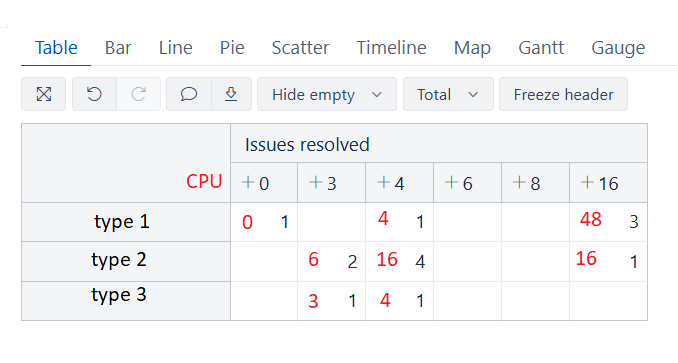
the total number based on CPU would be calculated as:
type1 = 0 * 1 + 4 * 1 + 3 * 16 ,
type2 = 32+44 + 161
type3 = 31 + 4*1
Could you please advise how to sum these attributes correctly across issues?
Thank you.