CASE
  WHEN
    [Issue].CurrentHierarchyMember.Level.Name = "Project" OR
    [Issue].CurrentHierarchyMember.Level.Name = "Epic" OR
    [Issue].CurrentHierarchyMember.Level.Name = "Parent"

  THEN
    Sum(
      Descendants([Issue.Epic].CurrentMember, [Issue.Epic].[Sub-task]),
      [Measures].[Issue Days]
    )
  ELSE
    [Measures].[Issue Days]
END
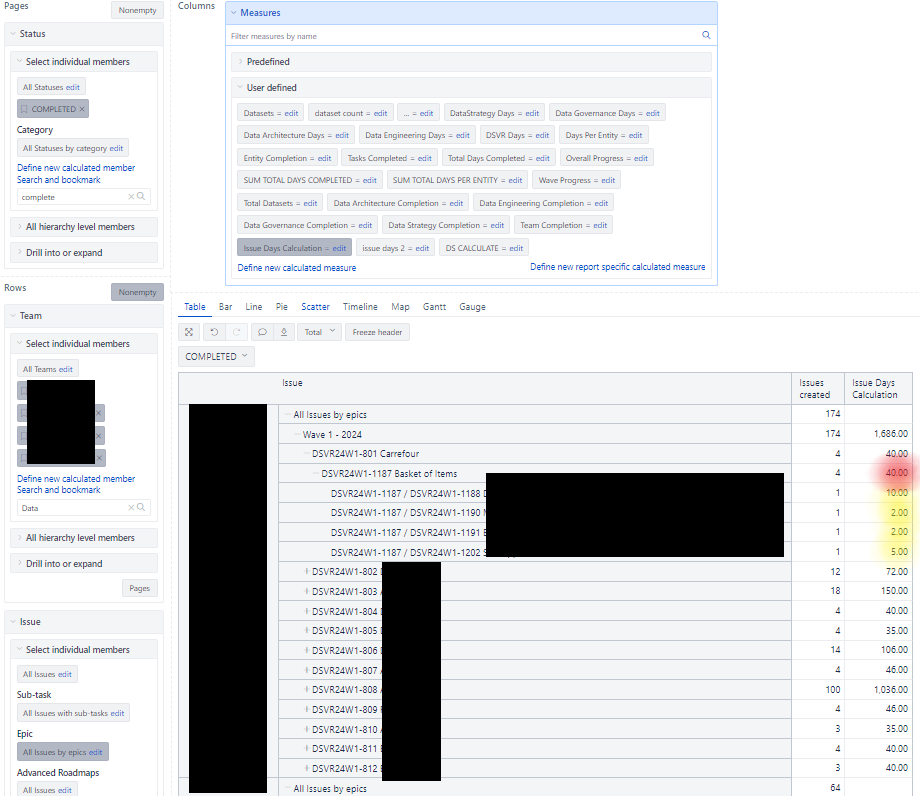
Need help with sum. it should sum all the issue days available in the children, it should only sum my defined rows and pages
photo attached yellow highlight sums 19 to the parent, epic, and project level, but shows 40 (is the sum issue days of the child issues)
Based on the screenshots you provided, it seems that you are referencing a property “Issue days”, and not a measure. Properties do not aggregate the value to the higher levels and only display information at the particular dimension member.
I suggest using a corresponding measure instead of the property to solve this issue. Check if you have a measure called “Days created”; it will aggregate the values on higher levels and work nicely with the Page filters. This measure would be linked to the Time dimension based on the creation date.
You can read more about Jira numeric custom field import in our documentation here: Jira custom fields
If you do not have the option to import this custom field as a measure, please check what custom field type you are using for this field in Jira.
If you are only interested in values from sub-tasks, you can create a new calculated measure using the following tuple:
([Measures].[Numeric field measure],
[Issue Type.By type].[Sub-Task])