Hi everybody!
I hope you can help me — I’m really confused.
Image:
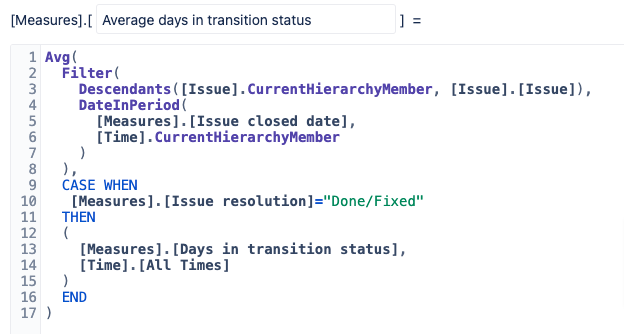
I’ve created a report, which you can see in the image “Red Frame at the Top.” using the custom MDX shown in “Red Frame in the Middle.” The numbers and data are correct, but the resolution for many issues is wrong. I don’t understand why. For example, GPHPOCLOUD-5480, the second entry in the list, is not in the “Unresolved” resolution—it’s actually “Done/Fixed,” as shown in “Red Frame at the Bottom.”
Additionally, I want to include “Resolution” in Pages so I can filter by “Done/Fixed.” However, it’s displaying incorrectly, preventing filtering. Can anyone explain where I’ve gone wrong?
Thanks & kind regards,
Timm
Hi @tflagmeyer,
Welcome to eazyBI Community and thanks for posting your question!
eazyBI considers an issue “resolved” only when it has a resolution date set in Jira. This is independent of the Resolution value (like “Done/Fixed”) - if your Jira workflow doesn’t set a resolution date when moving issues to “Done/Fixed” status, eazyBI won’t recognize these issues as resolved.
I recommend using the Issue Closed date instead. Heres what you should do:
- Go to your eazyBI import options (General tab)
- Specify which statuses should be considered as “closed” (e.g., “Done”, “Fixed”, etc.)
- Use “Issues closed” measure and “Issue closed date” in your reports
Learn more about Issues Closed here - See Issues closed measure documentation
Once you have defined the Closed/Resolved statuses, you can define your measure as follows. Note that in the last line, I have applied DefaultMember for the Time dimension. When DefaultMember is used with dimensions, it will ignore the selected members in the report (in this case Time filter you are using). Learn more about DefaultMember here - DefaultMember
Avg(
  Filter(
    Descendants([Issue].CurrentMember,[Issue].[Issue]),
    DateInPeriod(
      [Measures].[Issue closed date],
      [Time].CurrentHierarchyMember
    )
  ),
  ([Measures].[Days in transition status],
  [Time].CurrentHierarchy.DefaultMember)
)
Best wishes,
Elita from support@eazybi.com
Hi @Elita.Kalane,
thanks for your response.
Please don’t get me wrong, but:
Either I still don’t really understand it or your answer misses the point.
Even if I set / change everything as you suggest, it doesn’t change the point that the wrong thing is displayed under the “Resolution” column. (I tested it, same result.)
But I have found a workaround:
As you can see, I now only filter issues with the “Done/Fixed” resolution from the outset, which also works, the data is correct, I have checked it.
And despite this pre-filtering and correct data, if you now display the “Resolution” column, it shows the wrong one.
It shows “(unresolved)” for many issues and only “Done/Fixed” for a few, although ALL issues that are now displayed are “Done/Fixed”.
Possibly a bug?
Well, I have found a workaround.
We can close my request if you like.
Thanks & kind regards,
Timm
Hello @tflagmeyer
Thanks for the follow up and for additional information
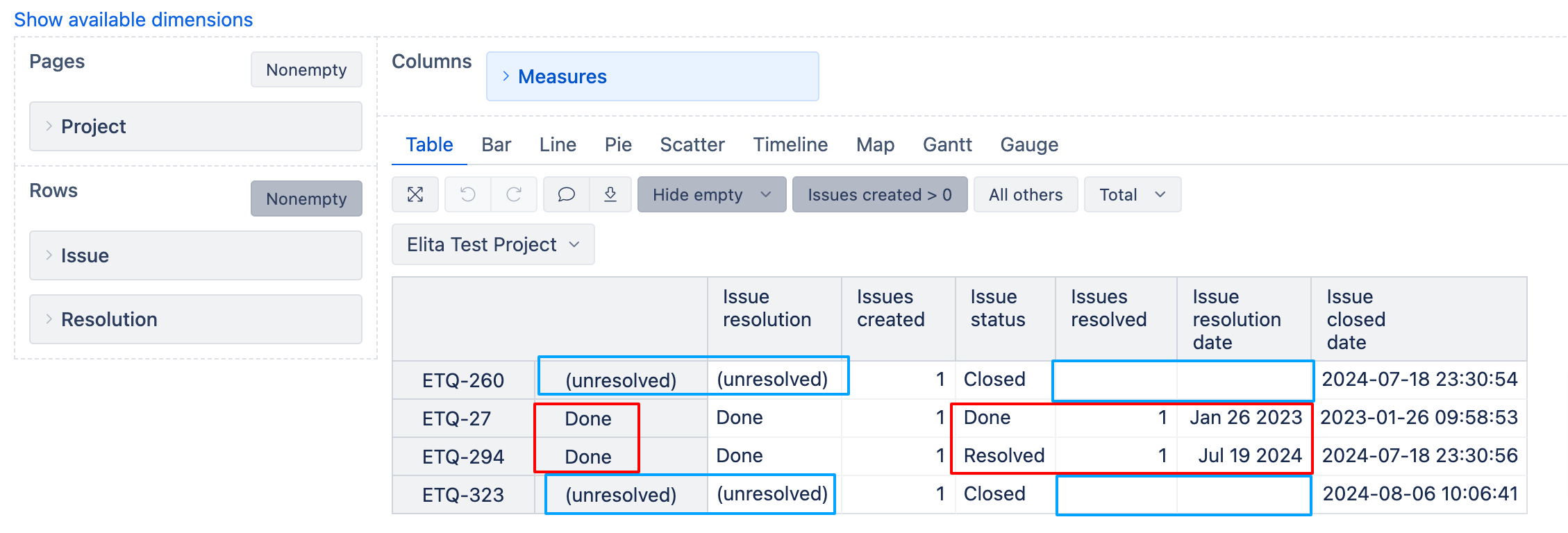
The Resolution dimension, similarly like Resolution Date, considers only those issues resolved, where Jira automatically applies a resolution date for the Issue. If your Jira status workflow is not enabled with a functionality where Resolution date is automatically completed when you resolve a ticket, eazyBI does not consider those issues resolved, which is why I suggested you to determine the status you consider as resolved statuses and use the “Issue closed date” in the measure.
See image below as an example. In my Jira workflow, I have marked that when issue is moved to statuses Done and Resolved, the resolution date is automatically filled, eazyBI recognizes the resolution date and also Resolution dimension sees those issues as “Done”. However, if my issues are moved to status Closed, Jira is configured in a way that Resolution date is not automatically filled, therefore eazyBI does not see the Resolution date as well and in the Resolution dimension - does not consider those issues resolved.
Can you please clarify - what is the purpose of the additional column (Resolution dimension) in your Report?
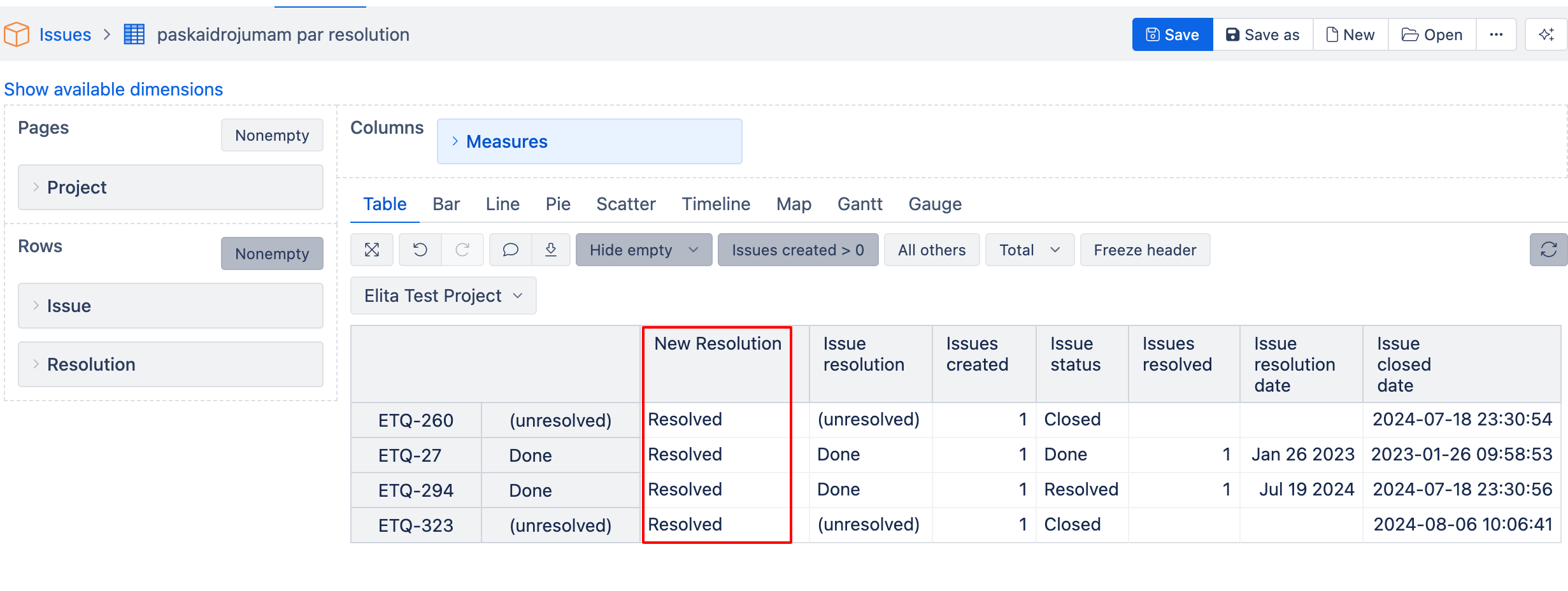
As an alternative, you may consider defining a new calculated measure with formula below (amend it accordingly, if more statuses should be considered as resolved) and select it in your report
CASE
WHEN
[Measures].[Issue status] MATCHES "Done|Fixed"
THEN
"Resolved"
ELSE
"Unresolved"
END
Best wishes,
Elita from support@eazybi.com