Hi @gerda.grantina
I have similar issue that I need to link tests to Features but the case is that one test can test multiple features so it seems that custom hierarchy is not possible to use. Is there any other way then (through some calculated measure) to get this kind of report?
So a list of features and then all tests linked to the features and then it will pull data from zephyr related to test case executions. I have managed to get the report so that I can view the tests and the test case executions and calculate the passed % but have not managed to get the list of features working. And I guess that also the total rows can be tricky to do?
As you already mentioned, the relation between Tests, Test Cycles with executions, and Features (or you may call them requirements) is complex because one test could cover several Features, and a Feature most likely is covered by several Tests.
eazyBI has integration with Zephyr Squad and Zephyr Scale and imports testing data, including relations between tests, executions, and requirements. Please see the documentation for more details on how to import those data and which measure to choose for your report:
Thanks. I have managed to bring in the Zephyr data and do the report showing the tests and test executions (columns C to N in the example excel shown in my original post) but I’m now missing how to show the features that the tests are linked to (Columns A and B in the example)
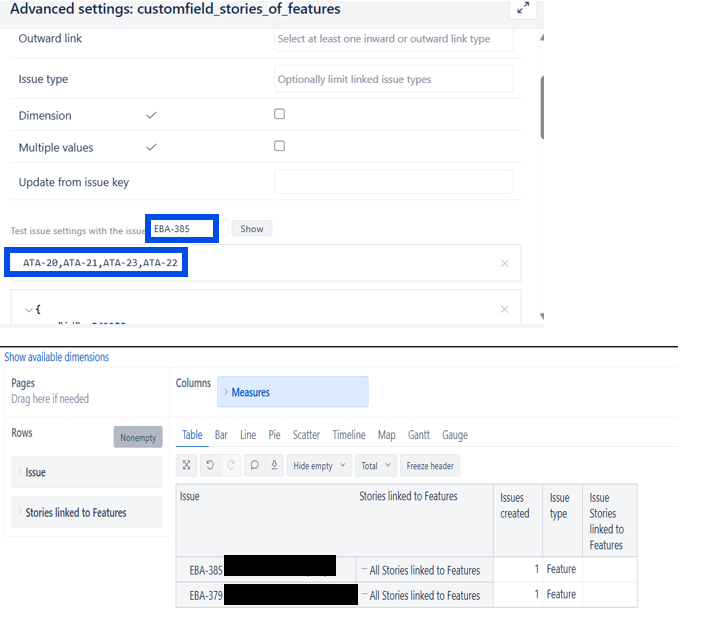
@gerda.grantina We follow SAFe and use the issue hierarchy Portfolio Epic - Feature - Story using link types ‘Parent of’ and ‘Child of’ in Jira. We have a plugin called Agile Hive that enables that. Portfolio Epic and Feature are a custom issue types in Jira. For now, I tried to add the below code for Features and Stories in the advanced settings. I tested the issue settings and it seems to be working (screen shot below) but when I use it in a report, it does not show the stories linked to the feature. I’m unsure what I’m doing wrong and would appreciate any help you can provide. Thank you!
Features linked to Stories
[jira.customfield_features_of_stories]
name = “Features linked to Stories”
outward_link = [“Parent of”, “Child of”]
multiple_values = false
dimension = true
Stories linked to Features
[jira.customfield_stories_of_features]
name = “Stories linked to Features”
inward_link = [“Parent of”, “Child of”]
multiple_values = true
dimension = true