Hi,
I need help in avoiding counting multiple time when I break it down by version. My issues are linked to multiple versions but once counted I would like to not count further. Please help. Thank you.
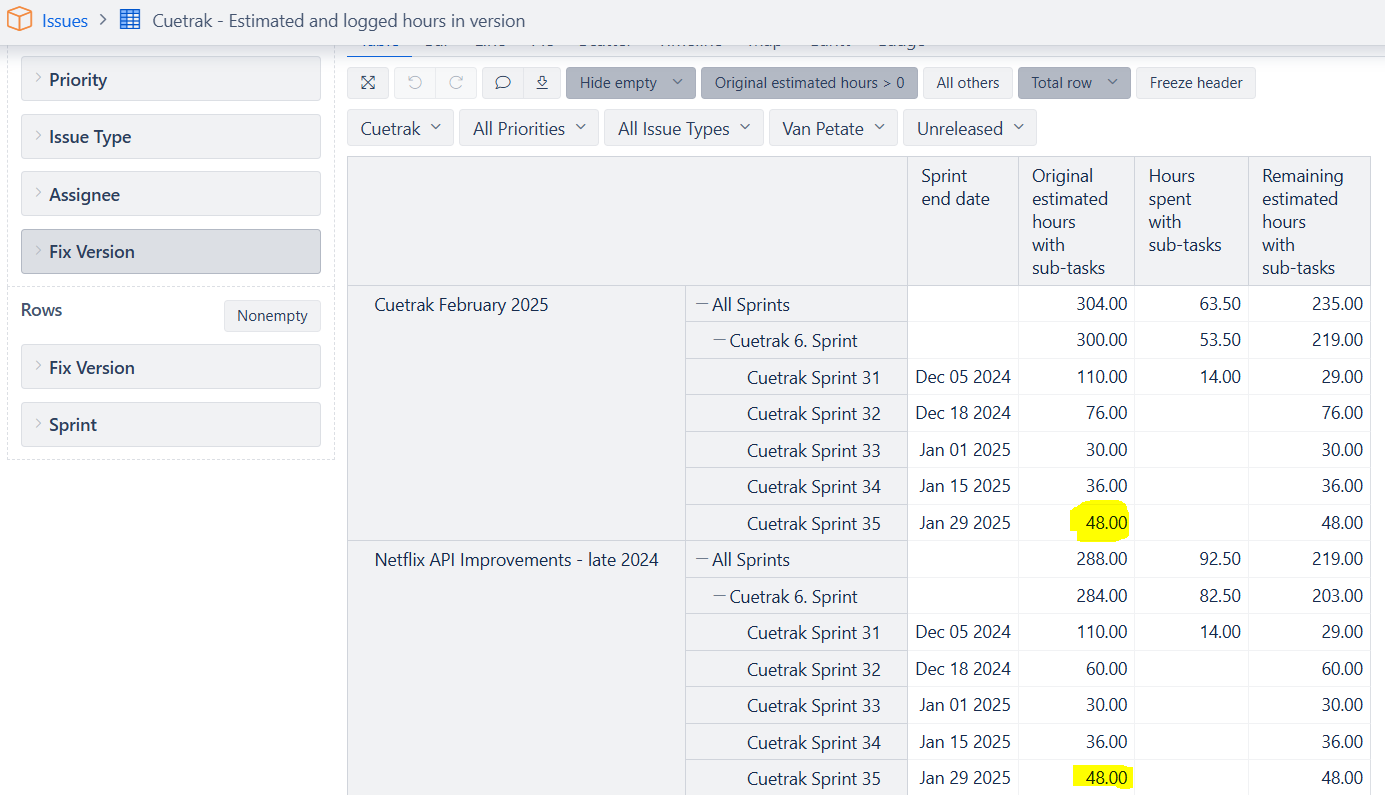
Hi @madhuyadali
I noticed there are no answers to this question. I hope you have already found some solution; however, I am adding a possible solution in case somebody else is looking for it.
This is a standard way how eazyBI behaves with multivalue fields, as there is no way to automatically detect which is the “primary” version on which to count the value. On aggregated levels (project, all versions), the values are still counted only once.
A rough workaround solution would be to extract the first mentioned version from the “Issue Fix versions” property and count the value only for this version.
However, the calculation would be slow as it iterates through all issues and versions; use it in a simple report only!
Sum(
  Filter(
    DescendantsSet([Issue].CurrentHierarchyMember, [Issue].[Issue]),
    Count(
      Filter(
        Descendants(
          [Fix Version].CurrentHierarchyMember,
          [Fix Version].[Version]
        ),
        [Fix Version].CurrentHierarchyMember.Name =
          Trim(
            ExtractString(
              [Measures].[Issue fix versions],
              '^([^,]+)',
              1
            )
          )
      )
    ) > 0
  ),
  [Measures].[ADD THE MEASURE NAME YOU NEED]
)
Use the measure you want to count in [Measures].[ADD THE MEASURE NAME YOU NEED].
Best,
Ilze, support@eazybi.com