Hello eazyBI Community everyone!
Setup
- Report Type: Line
- Page Filters: Time Dimensions
- Rows: Time Dimensions (displaying months on the X-axis, e.g., Jan 2026 to Dec 2026)
- Columns: Measures Dimensions
Question
I would like to control the data visibility based on the Page Filter selection without changing the time axis range.
Specifically, if I select a specific month (e.g., April 2026) in the Page Filters, I want the X-axis to still display the full year (Jan 2026 to Dec 2026). However, I want the line for the ‘Utilization’ measure (in Columns) to only plot data up to the selected month (Jan to April), essentially stopping at that point.
Is there a way to configure the report so that selecting a month in the Page Filters keeps the full year visible on the axis, but limits the ‘Utilization’ measure line to the selected date range?
Thank you for your assistance.
Hello @NextLife
Thanks for posting your question!
Yes, this can be configured, however, with slightly different set up.
The Page filter will determine your range, so if you filter the report by April, this will impact the range.
To also show the future months, you should make sure that the future months exist in your Time dimension. The way Time dimension determines if there should be any date members is based on the date fields assigned to your issues in Jira that you have imported into you eazyBI cube.
Please follow these steps:
-
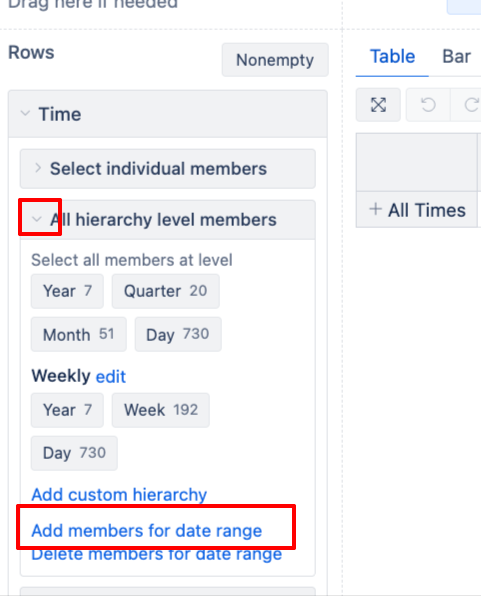
In Time dimension, click on “Add members for date range”. A pop up box will show up, type “Jan 1 2026 and Dec 31 2026”
-
This will create a date member for every day in 2026
-
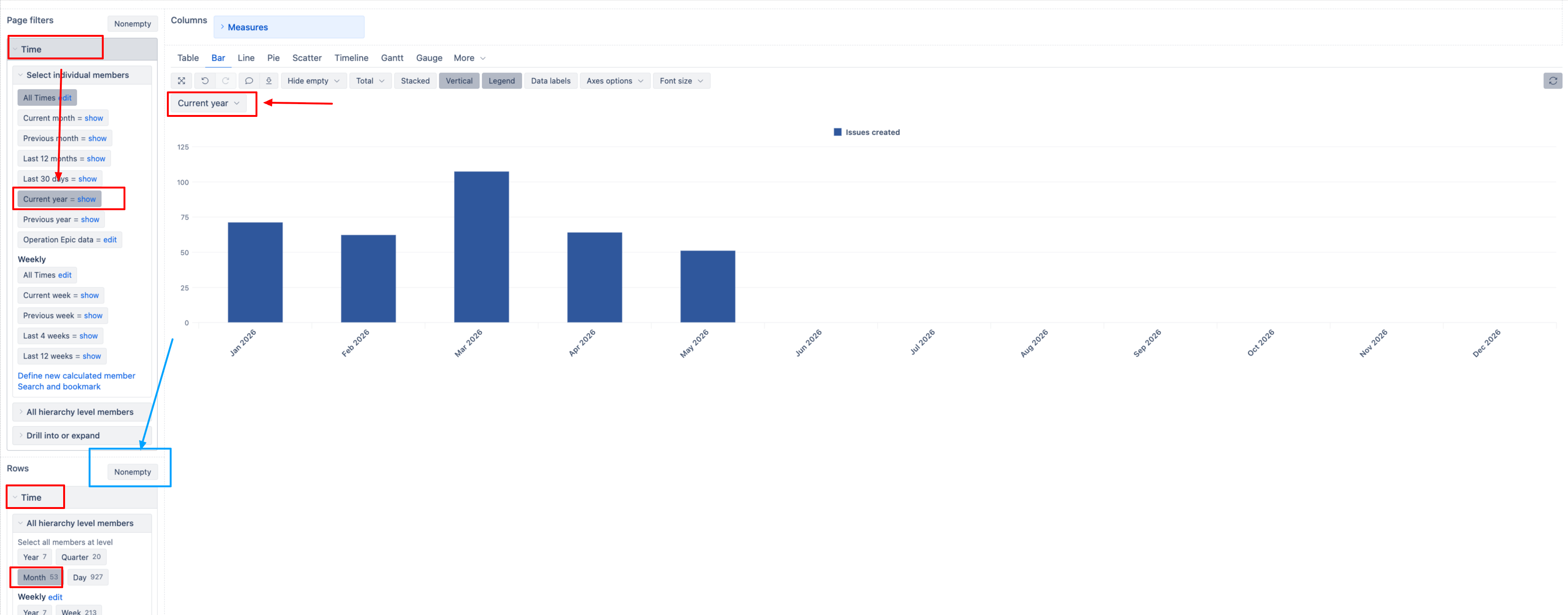
In your Time dimension in Page filters, select the member “Current Year”
-
In your Time dimension in Rows, select month level
-
Make sure nonempty is disabled in Report Rows.
Best,
Elita from support@eazybi.com
Hello, Thank you for your response.
I have applied the method you suggested. I am currently using the Measures dimension for the legend, which displays two values:
- Count
- Percentage
I would like to ask if it is possible to apply Page filters specifically to the “Percentage” measure only.
For example, if I apply a Page filter for April 2026:
- The X-axis shows January through December.
- The Count data displays from January through December.
- However, for the Percentage, I would like it to display only up to April 2026 (the filtered date), instead of showing the original range of January through June.
Is there a way to achieve this specific filtering behavior?
Thank you in advance for your help.
Hello @NextLife
Thanks for the follow up.
It is not possible to select the Page filter with only one month, but also to show the whole year. The period you choose to select in the page filter, will determine what you see in your report X axis.
However, you can limit the visible results by creating a new calculated measures for Percentage that limits its values displayed in the report based on a date condition.
Here is the approach:
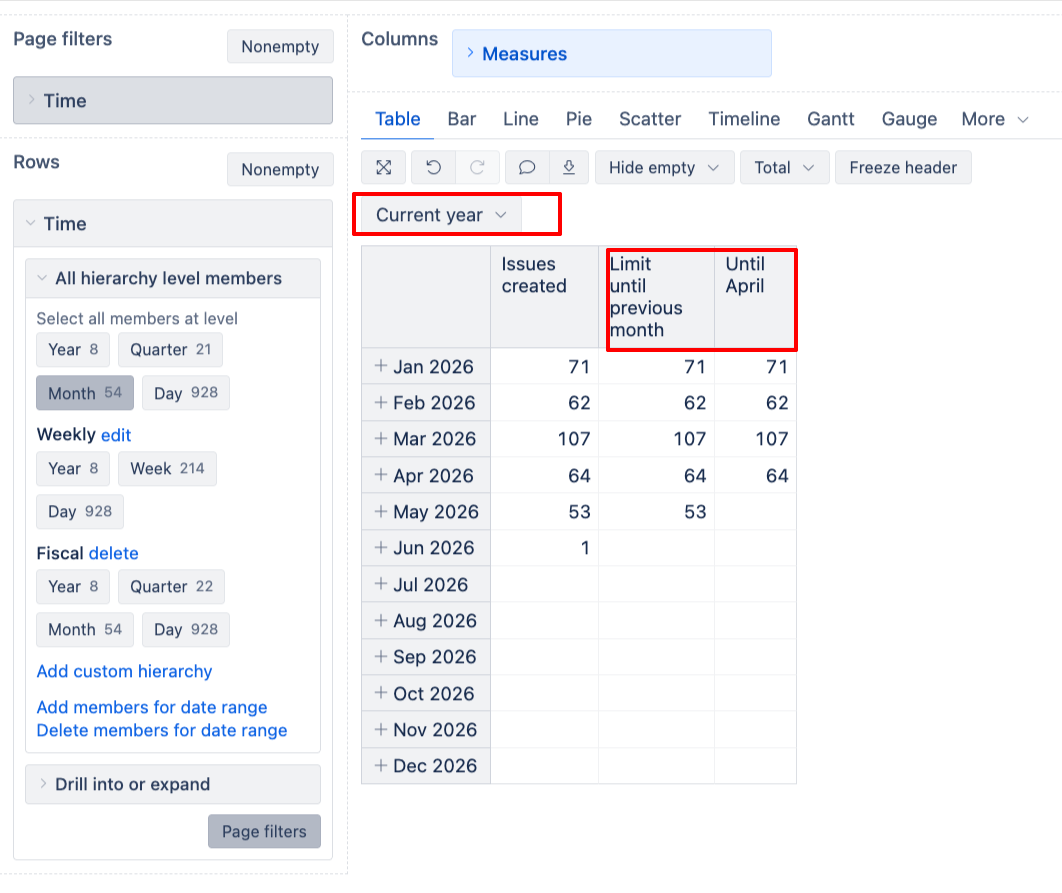
This measure will interactively limit values until the previous month
IIf(
  DateCompare(
    [Time].CurrentHierarchyMember.NextStartDate,
    [Time].[Month].CurrentDateMember.StartDate
  ) <= 0,
  [Measures].[Your Percentage calculation],
  NULL
)
Replace the Your Percentage calculation with the measure name you have for your Percentage calculation.
If you want to limit the results specifically till April, you can define a new calculated measure like this. :
IIf(
  DateCompare(
    [Time].CurrentHierarchyMember.NextStartDate,
    [Time].[2026].[Q2 2026].[Apr 2026].NextStartDate
  ) <= 0,
  [Measures].[Your Percentage calculation],
  NULL
)
Here’s how it may look
Let me know if you have any further questions!
Best,
Elita from support@eazybi.com
Hello, Thank you for your response
I am currently following the steps you provided, but I encountered an issue with the Page Filter behavior.
When I select a specific month (e.g., “March”) in the Page Filter instead of “Current year,” the X-axis changes to show only “March,” and the percentage data is also limited to that single month.
However, my goal is to maintain the full timeline on the X-axis (January to December) regardless of the Page Filter selection, while having the Percentage data reflect the period from January up to the selected month (e.g., January to March).
Could you please review this requirement and let me know if this specific visualization logic is feasible?
Hello @NextLife
Thank you for the follow up.
Can you please clarify which steps did you follow?
It not possible to select March but show something else in the X-asis. What you select in the Page filters will determine what is shown in your X axis, if you select March, then only March will be shown. You can limit the result shown by creating independent measures (in the Measures dimension) and forcing the measure to display the results up to a certain month - in my previous response I have shared the exmaples of Measures and what is retuned against the filtered Time.
Best,
Elita from support@eazybi.com