Hi
I need to calculate number of Epic’s child tickets. I created a report with Issue as Rows.
When i use this script, it returns all zeros unless i select “All issues by epics”
Count(
Filter(
[Issue].CurrentHierarchyMember.Children,
([Issue].CurrentHierarchyMember.Get(‘Issue type’) = ‘Story’ OR
[Issue].CurrentHierarchyMember.Get(‘Issue type’) = ‘Task’)
AND [Issue].CurrentHierarchyMember.Get(‘Status’) <> ‘Rejected’
)
)
Can you help me understand why?
Thx
Hi @alexf1972
It is related to hierarchies - how issues are grouped in “Issue” dimension
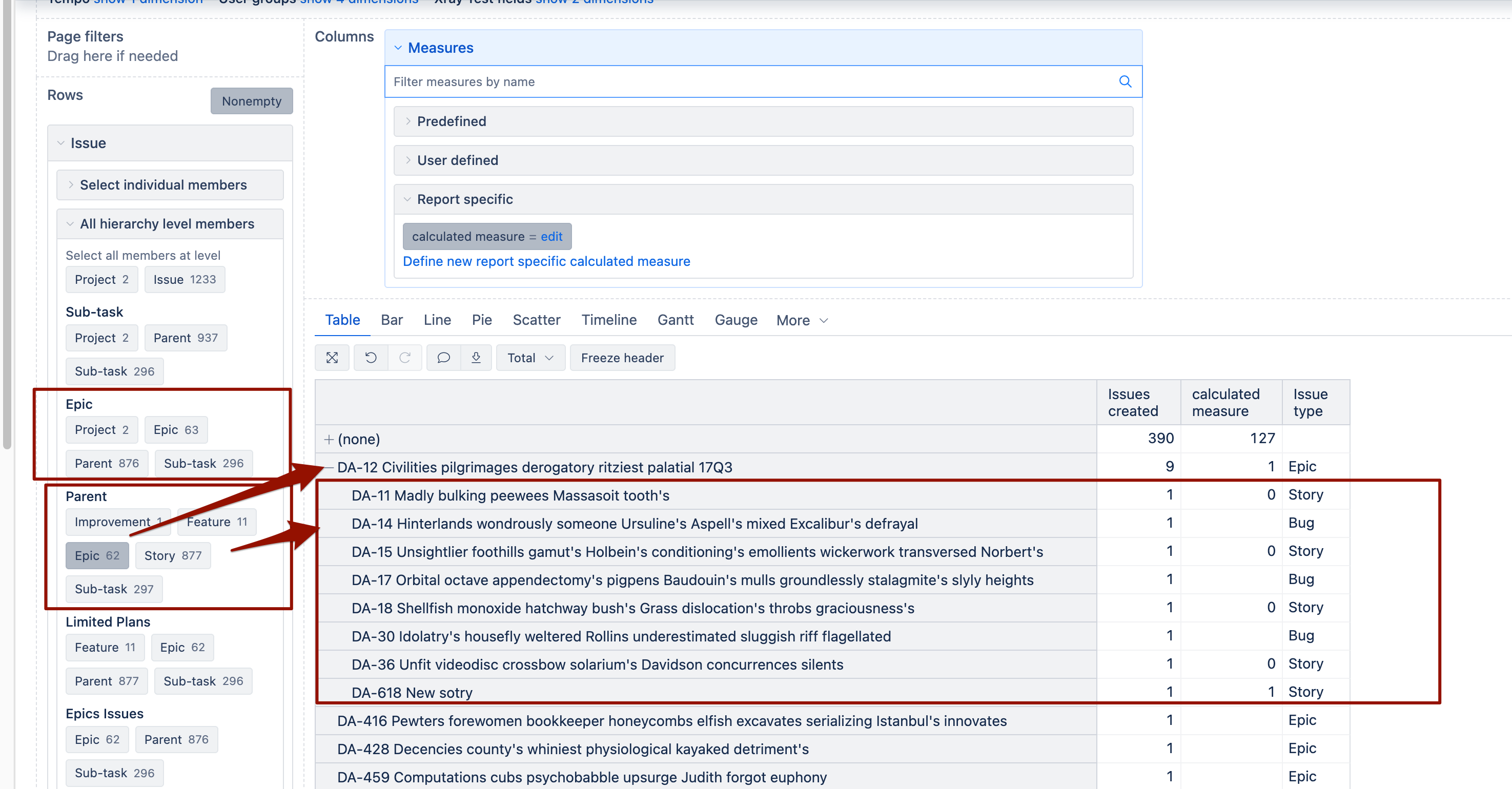
The default hierarchy in the Issue dimension has just two levels: “Project” and “Issue”. The lowest level is the issue, and there are no relationships between epics, tasks, and stories. In that hierarchy Stories and Tasks are not children of an Epic
You would need to switch to Issue.Epic or Issue.Parent hierarchy and select “Epic” level to see the children of the epic.
Then you can create a user-defined calculated measure using this fast method:
Sum(
{
[Issue Type].[Story],
[Issue Type].[Task]
},
[Measures].[Issues created]
)
-
Sum(
{
[Issue Type].[Story],
[Issue Type].[Task]
},
(
[Measures].[Issues created],
[Status].[Rejected]
)
)
The “Story” level name in my screenshot represents all direct children below Epic (also with issue type task, bug etc).
This code would automatically aggregate results from the children of the epic when in the hierarchy where issues are grouped by relationships between them.
Martins / eazyBI
Thank you, Martins. This is make sense.
I have following question. If i use page filter and filter by label, will it apply to all tickets (epic and story) or only story issues? (it looks like only for story issues under epic)
Thanks
Hi @alexf1972
If you use the “Label” dimension as a page filter, it would filter the label for all tickets in the hierarchy and count tickets by this label in the hierarchy.
If you want to calculate the “Issues created” value for stories and tasks by the label of their epic, you could introduce a new inherited dimension, “Epic label,” and use that as a page filter.
See this documentation page : Issue link field dimensions
Martins / eazyBI