Hello Everyone,
I have a question regarding reporting on Assets data in Jira Service Management Data Center.
Our Assets model contains two object types:
- Host – contains attributes such as **Host Name**, **FQDN**, and **IP Address**.
- Business Service – contains attributes such as **Business Service**, **Business Owner**, and **Business Owner Department**.
The relationship between the two object types is configured so that Business Service references Host, meaning that from the Host object the relationship appears as an inbound reference.
I want build a report with the following output:
- Host Name
- FQDN
- IP Address
- Business Service
- Business Owner
- Business Owner Department
Since the information is split across two related object types, we’d like to understand whether this is achievable in eazyBI.
Specifically:
- Can eazyBI import the Assets object relationships and produce a single report combining attributes from both the **Host** object and the linked **Business Service** object?
- Is this possible using the standard Assets import, or would it require calculated attributes or any additional configuration?
- If anyone can provide guidance or documentation on the recommended approach?
Thank you in advance for your assistance.
Hi @Nivine
You reached out to eazyBI support directly with the same question. We did not hear back from you. I will share the suggested solution here as well:
Data Import
As the Business Service objects have a reference to the Host objects. I recommend the following approach. In the Assets source application import options, find both object type attributes and select the desired ones for import. For Host - Host Name, FQDN, and IP Address. For Business Service - Host, Business Owner, and Business Owner Department. Import data.
Please look at our documentation page for more information on Assets object type attribute import - Assets.
Report
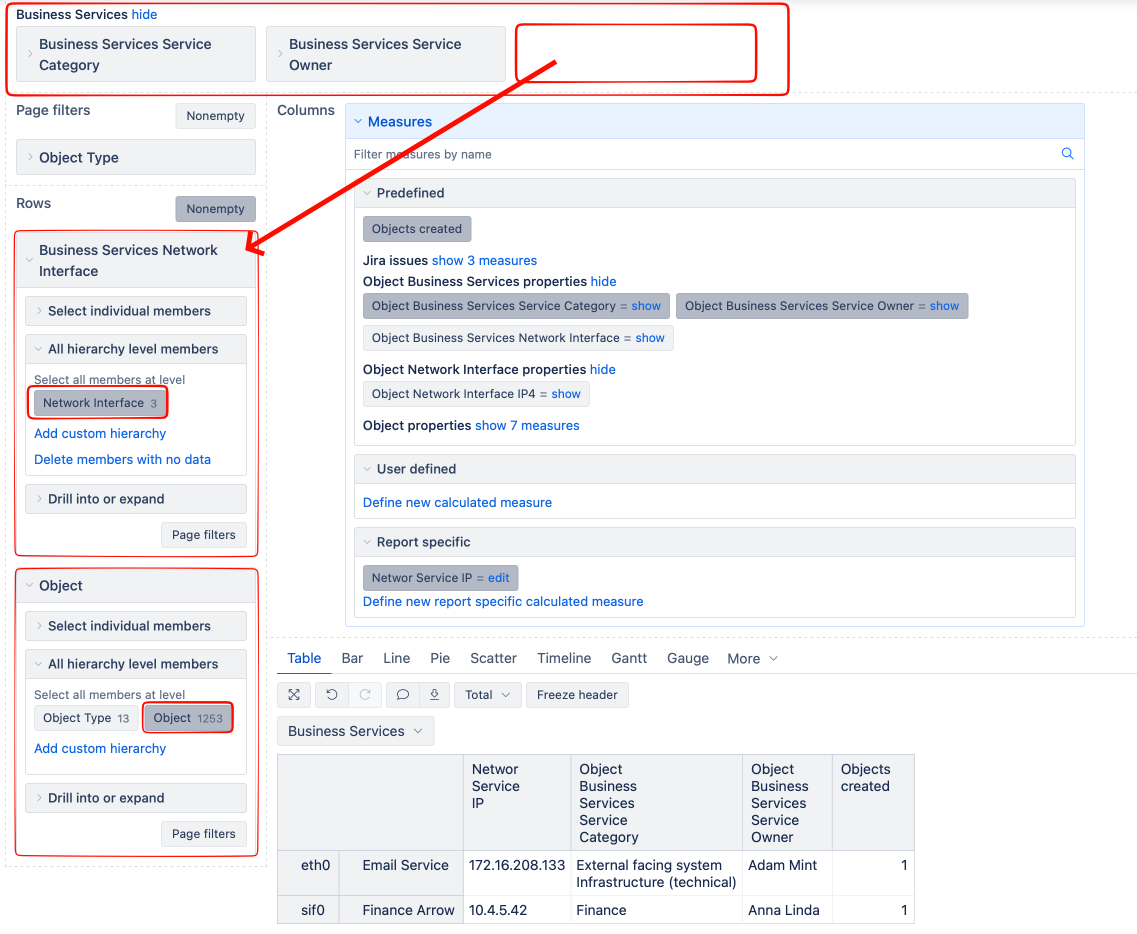
After a successful data import, create a new report, and use the Business Service Host dimension in the report rows to return all the Hosts referenced in “Business Service” type objects. Use the Object dimension to view all the connected “Business Service” type objects. This way, you can use the predefined properties “Object Business Service Owner” and “Object Business Service Owner Department” to view the information.
Calculated measures
To view the Host attributes, please define new calculated measures. The formula could look similar to the one below for the “FQDN” attribute:
[Object].[Object].GetMemberByKey( [Business Services Host].CurrentMember.Key ).Get('Host FQDN')
The formula might require some changes, depending on how precisely you shared the object type and attribute names. Create similar formulas for “Host name” and “IP Address”.
Please look at our documentation page for more information on defining calculated measures - https://docs.eazybi.com/eazybi/analyze-and-visualize/calculated-measures-and-members/calculated-measures.
The report could look similar to the one below:
Best,
Roberts // support@eazybi.com