Hi Expert,
Need one help,
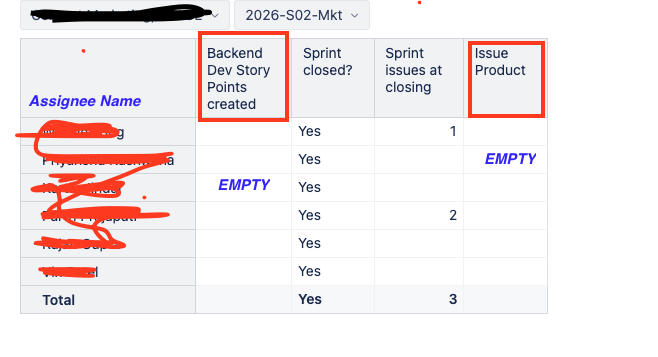
When I am selecting a Close Sprint in Sprint Page Filter. it’s showing EMPTY Data for a Custom Fields. Kindly suggest how can I fix this, field have data but showing empty.
Hi @VY_NY,
Thanks for posting your question!
To figure out why the “Issue Product” field shows up as empty when you filter by a closed sprint, could you please:
share the report definition? You can export it from the three-dot menu → Export → Report definition. If you don’t want to share it publicly, feel free to send it to support@eazybi.com with a reference to this community post.
check what happens if you remove the sprint filter, or switch it to an active sprint - does “Issue Product” show values then?
Once I have a bit more information, I’ll be happy to take a closer look and help you sort this out.
Best,
Marita from support@eazybi.com
Hi @Marita_Burgio
Thanks for your response!
After removing the Sprint filter, report is showing value of “ backend dev story point” field. SUM of the Backend Dev Story Points assigned to each assignee.
But showing empty when selecting Closed Sprint in Sprint Page filter.
Hi @VY_NY,
Thanks for the additional information.
You can do a troubleshooting following the process described here: Troubleshooting report data
Based on the screenshots, it seems that there are no “Backend Dev Story Points created” for the selected assignees in the filtered sprint. The “Issue Product” field is empty because it is an Issue dimension property and requires Issues to be placed on the report rows.
If you need some help with troubleshooting your report, feel free to send it to support@eazybi.com with a reference to this community post.
Best,
Marita from support@eazybi.com