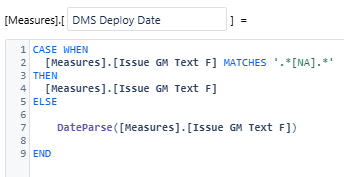
I have a report calculated measure that converts a custom string field into date value “Deploy Date”.
I want to display the issues resolved not by Issue resolution date, but by this Deploy Date.
I cannot figure out how to get the time dimension to control this Deploy Date instead of Issue resolution date.
I cannot import this custom filed into a measure, only has a property (its the only option)
Hi @Leigh_Parrott,
Please provide more details about the field’s contents and what expression you use to convert it to a date.
If there is one specific pattern or the field is generally a date that is saved in a string field, the most efficient way is to use JavaScript calculation to extract the date from that field during import and import it as a date value and as a measure.
The AI assistant for calculated fields (https://docs.eazybi.com/eazybi/analyze-and-visualize/ai-assistants#AIAssistants-CustomFieldAssistant) might help with the actual coding.
Then, you might use the newly created measure like this.
([Measures].[Issues with deploy date],
 [Resolution].[Done])
If the deployment marks the issue completion, you might even use the measure on its own without specifying the resolution.
The situation is a bit different if the deployment date depends on some other report context.
In that case, you might have to iterate through the issues in the data cube and inspect each issue individually for the specific deployment date being in the selected Time period.
Please share more details about the contents of the field to see how it could be done in the most efficient way.
Regards,
Oskars / support@eazyBI.com
Thank you Oskars,
The deploy date is a string field that is used as a string for other teams, it is only a date for this teams reporting so I cannot change how it is imported, that is why I’m using a calculated measure to convert to date format.
@Leigh_Parrott Thank you for the update.
You can create an additional calculated field using the same logic, instead of modifying the original field.
You might first identify if the issue relates to the team using dates and then apply the same conversion logic in the JavaScript.
Issues without dates or not relevant for the specific team should still get an undefined “null“ as a value, but relevant issues could be analyzed using a simple measure retrieved directly from the database.