Hey team,
How can I develop a report to only address Xray tests in a specific Test Repository Path? For instance when I look at a project and look at Xray Repository, I can see several folders which appear on the ticket as the Test Repository Path.
How can I build a report that covers one or more of these Test Repository Paths? is it via a calculated measure or something else?
Thanks in advance for your advice team.
Cheers
Dave
Hi @David_Horne,
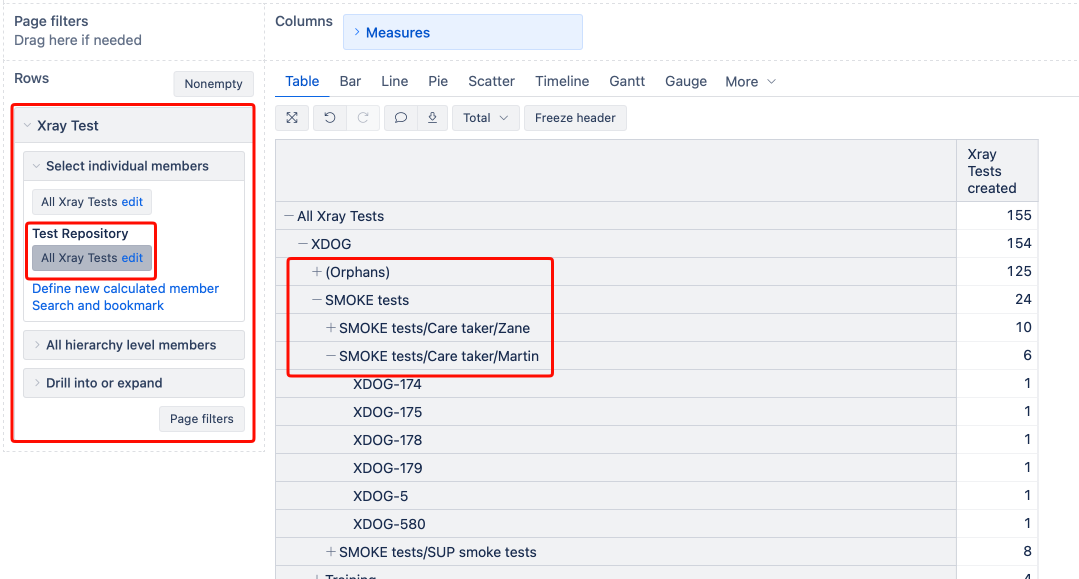
Use the “Test repository” hierarchy in the Xray Test dimension. It has the in Project, Folder, Subfolder, and Test levels. If a top level has multiple sub-folder levels, the “Subfolder” level will display the path to the lowest level folder. See an example in the screenshot below:
Please look at our documentation page for more information on Xray dimensions - Xray Test Management.
Best,
Roberts // support@eazybi.com
1 Like
Thanks for that @roberts.cacus , much appreciated.
1 Like